







Spreadsheet tool

Add gender to your spreadsheet

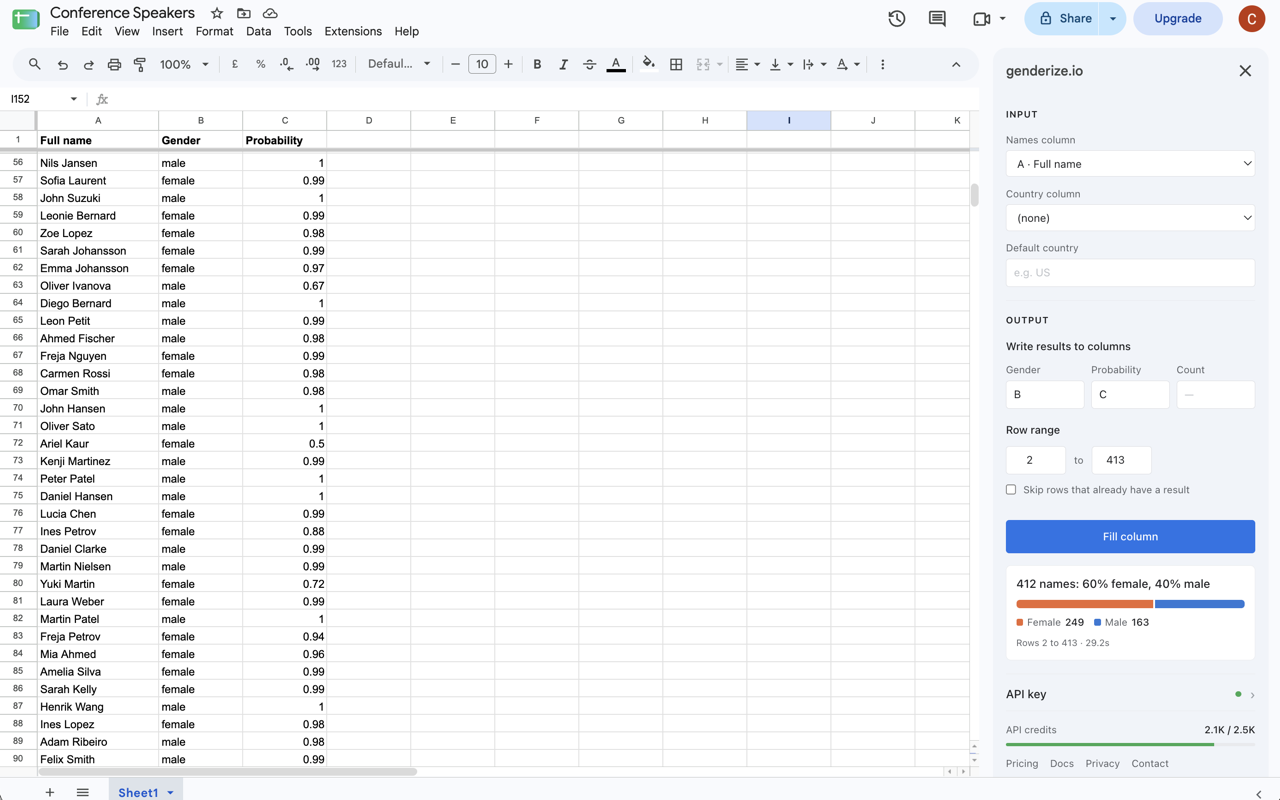
Upload a list of names as CSV, Excel or JSON and download the same file with a gender column and a probability score added to every row. No formulas, no code.

  • 2,500 names a month free
  • No credit card
  • Files up to 50 MB
journal_authors.csv Enriched
first_name last_name +gender +gender_probability
Sofia Rossi female 0.99
James Walker male 1.0
Priya Nair female 0.98
Lars Eriksen male 1.0
Kim Lee female 0.75
Mateo Silva male 0.99

Showing 6 of 1,204 rows

Trusted by leading organizations

The Guardian logoColumbia University logoUber logoNature logoMIT University logoShopify logoThe Washington Post logoYale University logo

How it works

Add gender in a matter of minutes

Everything happens in your browser with nothing to install.

Read the walkthrough in the docs
  1. 1

    Upload your file

    Drop in a CSV, Excel or JSON file with a header row. Column order doesn't matter.

  2. 2

    Pick the name column

    Full names in one column, or first and last names in two. Add a country column to sharpen the predictions.

  3. 3

    Download the result

    You get the same file in the same format, with gender and probability columns appended to each row.

Supported formats

Works with the files you already have

Export from Excel, Google Sheets, Airtable, your CRM or a publication database and upload it as it is.

  • Files up to 50 MB
  • Comes back in the format you uploaded
  • Original columns kept, new ones appended

CSV and TSV

.csv .tsv

Comma, semicolon, tab or pipe delimited. UTF-8, UTF-16 or Windows-1252.

Excel

.xlsx .xlsm .xls

The first sheet is read, and formulas come through as their values.

JSON

.json

An array of objects, or an object with a single data key.

JSON Lines

.jsonl .ndjson

One JSON object per line.

Use cases

Built for lists of people

Most files that come through are lists of people in a role — authors, speakers, customers. Enrich the list, then pivot the new column to see the whole group at a glance.

Author lists

See the gender split of first and last authors across a journal, a field or a decade. Export from Scopus, Web of Science or PubMed and upload as is.

Speakers, grantees and trial leads

Measure gender balance across speaker line-ups, grant recipients, principal investigators or inventors.

Customer and mailing lists

Know the gender mix of your customer base, subscribers or donors, straight from a CRM or shop export.

Submissions and reviewers

Compare the gender split of submitting authors with that of the referees who review them.

Sources and bylines

Audit who gets quoted and who gets the byline across months of coverage.

Contributors and communities

Find the gender split of your contributors, testers or event participants.

What you get

New columns, next to your data

Pick the columns you want. Age and nationality can be added in the same run, each counted separately.

gender male or female
gender_probability How certain the prediction is, from 0 to 1
gender_count How many records the prediction is based on
See our open accuracy benchmarks

Pricing

2,500 names a month, free

Each row counts as one name per service you turn on. A 10,000-row file with gender only uses 10,000 names.

Runs that would go over your quota don't start, so there are no surprise charges. Paid plans cover bigger files, and you can cancel any time.

See pricing

Frequently asked questions

Do I need to write any code?
No. Upload the file in your browser, pick the name column and download the result. If you want to automate it later, the same account works with our API and no-code integrations .
What does it cost?
2,500 names a month are free on every account. A run costs rows × services, and runs that would exceed your quota don't start. Paid plans cover larger volumes.
What happens to my file?
Your file is held in memory while you work with it and discarded afterwards. We don't keep a copy. Read more about how we handle data on our GDPR page .
Which name formats work?
Full names in one column, or first and last names in separate columns. Diacritics and non-Latin alphabets are supported.
How accurate is it?
Every row gets a probability and the number of records behind the prediction, so you decide how to treat uncertain names. Predictions describe name statistics, not individuals, so they are most reliable across a whole list. We publish open benchmarks .
Can I add a country column?
Yes. Pick a column with two-letter country codes and each prediction is scoped to that country, which sharpens results for names that differ between countries.

Enrich your first file in minutes

Create a free account and you go straight to the upload screen.

Create free account

Already have an account? Log in